 Wheel Scout
What a VIN check shows
Every car sold in the US has a 17-character Vehicle Identification Number. States, insurance companies, junk and salvage yards report what happens to that VIN to the National Motor Vehicle Title Information System (NMVTIS), the federal title database run under the U.S. Department of Justice. A VIN check reads that record, so you see what the seller's ad leaves out.
Basic history report
By VIN or license plate · official NMVTIS record · shows right away
- Salvage, junk, flood and rebuilt title brands
- Title history by state, with dates
- Odometer readings and rollback flags
- Total-loss records from insurers
- Theft check
- Market value for the car
Full vehicle history report
By VIN or license plate · Not instant: emailed or texted to you within two hours
- Every owner, how they used it (personal, lease, rental or fleet) and where
- Accidents and damage reports
- Title brands: salvage, junk, rebuilt, flood, fire, hail, lemon
- Odometer readings over time, checked for rollbacks
- Service and maintenance history
- Open recalls and common owner complaints for the model
The red flags it catches
These are the problems that cost buyers thousands, and the ones a seller is least likely to mention.
See a sample
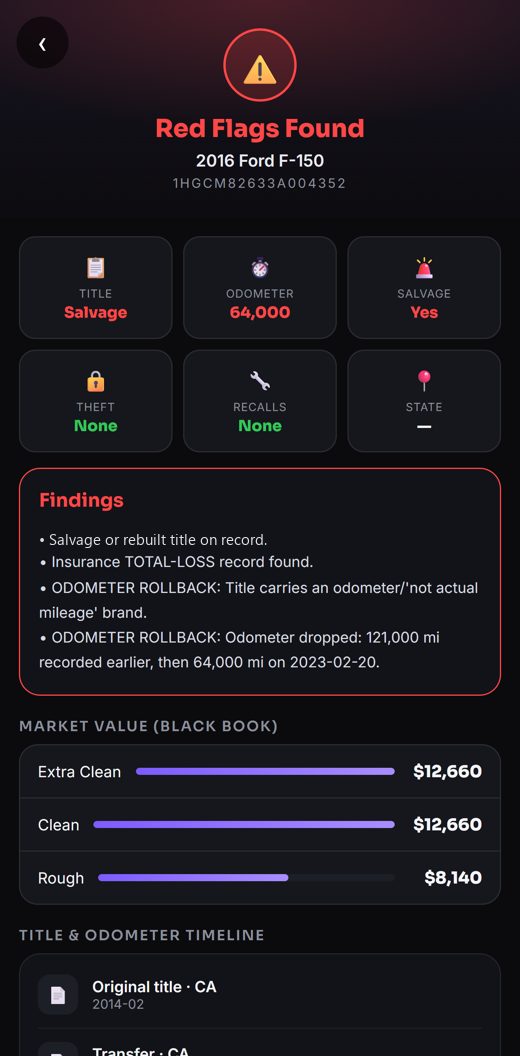
This sample is what a bad result looks like: a salvage title, an insurance total loss, and an odometer that went from 121,000 miles down to 64,000. A seller can still call a car like this "clean title, low miles" in the ad.
A clean car shows "No major red flags" at the top, with every title event and odometer reading listed underneath so you can see it for yourself.
How it works
Where to find the VIN
- Dashboard: look through the windshield at the bottom corner on the driver's side.
- Driver door: open the door and check the sticker on the door frame.
- Paperwork: the title, the registration card and the insurance card all print it.
- From a listing: ask the seller for it before you drive out. A seller who won't share the VIN is a red flag on its own.
A VIN is always 17 characters and never uses the letters I, O or Q, so they can't be confused with 1 and 0. The 10th character is the model year. Don't have the VIN? Look the car up by its license plate instead.
VIN check questions
What does a VIN check show?
The $5 basic history report is the official NMVTIS title record: salvage, junk, flood and rebuilt brands, title history by state, odometer readings with rollback flags, total-loss records and a theft check. The $10 full report adds owners and how the car was used, accident and damage reports, and service history.
Do I need an account or a membership?
No. Pay once for the report you want. We save it to an account under the email you pay with, so you can open it again any time in the Wheel Scout app.
Can I check a car by license plate?
Yes. Type the plate and pick the state it's registered in. We find the car's VIN and show you the year, make and model before you pay. More on plate lookups.
How fast do I get the report?
The $5 report shows on screen right after you pay. The $10 full report is not instant: we email or text it to you within two hours, and it's saved in the app.
What if the VIN is wrong or the car isn't found?
You see the car before you pay. If no car matches what you typed, you're never asked to pay for it.
Is a clean report a guarantee?
No report can promise a car is perfect. It shows what was reported to the title database and our data sources. Always have a mechanic inspect a used car before you buy it.
More ways to check a car
Find the deal, then check it.
Wheel Scout alerts you the moment an underpriced car posts on Marketplace, OfferUp or Craigslist near you, and runs the history right in the app.
The basic history report uses NMVTIS data from an approved NMVTIS data provider. NMVTIS records come from states, insurers and salvage yards; not every event is reported to it. Wheel Scout is not affiliated with any marketplace or government agency.